Our Products

product
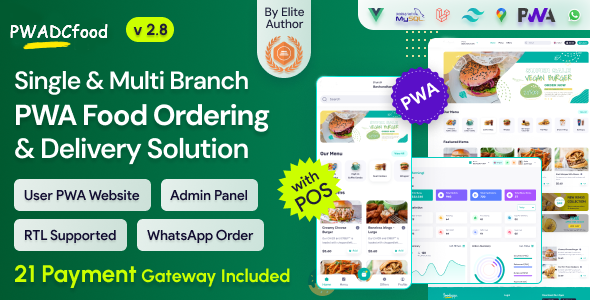
  1. Introducing “PWADCfood” revolutionizes food delivery with its progressive web application (PWA) interface, enabling admins to receive orders via WhatsApp. Its robust admin panel streamlines restaurant management and enhances efficiency. Integrated POS offers a comprehensive solution for food and restaurant businesses, promising convenience and effectiveness.
  2. Web & App Login Credentials

    Admin
    email: admin@example.com
    password: 123456
    Pos Operator
    email: posoperator@example.com
    password: 123456

    Customer User Journey
    • Users can see the home page. Now he can set the current location and allow the location access. Here have the variant types of food, offer, and 2 types of foods. like non-veg and veg.
    • The user can log in to the system with his email and password. otherwise, he can signup for this with some information.
    • Easily customers can filter the product by category-wise list and grid view also.
    • When customers click on a product there have possible many options like product variation, extra, and some addons also. They can easily manage the product quantity and add it to the card.
    • If the customer clicks the “process to checkout” button he could see the checkout page. if the customer did not have a login then it will redirect to the login page and after login, signup, or guest login then he can see the checkout page.
    • The checkout page has many functions. first of all, the customer can select the can take away for the order or deliver the product. now select the nearest branch. then select his delivery address. if the delivery address is not available then create an address first. now select which time he can get the order and select the payment gateway like cash on delivery and other card payment options. if you have a coupon the customer can use the coupon for the discount. now click the place order button.
    • Now the customer can see his order details with the current status for this order on the order summary page.
    • There has the option to see the previous order. then go to the user dropdown option then see my order link then click my order link the customer can see the previous order.
    • There has a chat option. where customers can easily contact the branch manager by chat. go to the chat menu from the user dropdown and select a branch and start a chat.
    • Customer can manage their address from the user dropdown menu and click add a new address and fill up all information with select the map location also.
    • If the customer can edit their profile, then go to the user dropdown page and click edit profile. now he can change his phone number, email, etc.
    Frontend Features
    1. Home Page
      1. Allow location
      2. Branch switch
      3. Language switch
      4. Search item
      5. Menu-wise item search (Category)
      6. Veg/Non-veg wise item search
      7. Newsletter subscription
      8. Footer section
    2. Menu page
      1. Menu-wise item search (gird and list view)
    3. Variation page
      1. Show variation (single and multi-variation)
      2. Add to cart
    4. Cart page
      1. Set all product lists with variation and addon also
    5. Checkout page
      1. Get branch select option
      2. Add delivery address system
      3. Delivery time add
      4. Add Payment gateway
      5. PayPal
      6. Stripe
      7. RazorPay
      8. FlutterWave
      9. PayStack
      10. Bkash
      11. Sslcommerz
      12. PayTm
      13. MercadoPago
      14. SenangPay
      15. Cashfree Payments
      16. Mollie
      17. Item list also
      18. Add coupon system
    6. My orders
      1. Set my order list (active & previous order)
      2. Order view (active & previous order, Cancel order also)
    7. Auth
      1. Login with guest login
      2. Register
      3. Forget password
    8. Profile
      1. Address CRUD
      2. Profile edit
      3. Change password
      4. Messing system
    9. Other page
      1. Contact us
      2. About us
      3. Terms & conditions
      4. Privacy
    Backend Features
    1. Dashboard
    2. Items
      1. Item info
      2. Item variations
      3. Item extras
      4. Item addons
    3. POS
    4. Live orders
    5. Orders
      1. Order info
      2. Invoice
      3. User details
    6. Coupons
    7. Offer/Promos
    8. Review (remove)
    9. Push notification
    10. Messing
    11. Users
      1. Admins
        1. Profile
        2. Security (change password)
        3. Location
        4. orders
      2. Delivery Boy
        1. Profile
        2. Security (change Password)
        3. Location
        4. Orders
      3. Customer
        1. Profile
        2. Security (change password)
        3. Location
        4. Orders
    12. Accounts
      1. Transactions
    13. Reports
      1. Sales
      2. Item (which item is a high-selling item)
      3. Credit Balance (user wallet balance)
    14. Settings
      1. Company
      2. Site
      3. Logo & icons
      4. Branches
      5. Mail
      6. Currencies
      7. Taxes
      8. Item Categories
      9. Item Attributes
      10. Sliders
      11. Pages
      12. Languages
      13. SMS
      14. Notifications
      15. Socials (optional)
      16. OTP
      17. Analytics
      18. Cookies
      19. Payment Gateways
      20. Role & Permissions
      21. App
      22. License Code
      23. Addons
      24. Update

Comments

Absolutely love it! This software is incredibly user-friendly. Makes everything so much simpler!

September 23,2023 At 08:31am

Leave a Comment

Comment*

Reviews

Very Nice

August 16,2026 At 07:07pm

I recently had the opportunity to use Multi-Branch Restaurant Software, and overall, I was quite impressed with its performance and capabilities. This software offers a range of features that make it a valuable tool for various tasks, but it does have a few areas where it could improve.

September 23,2023 At 08:20am

Write Your Reviews

(0.0)

comment*

Up to Top